
Hourly servers
How the hourly virtual server rental system works and what features are important to know before using it.
How to buy a server "by the hour"?
When purchasing any plan (except promo), you can choose an hourly rental period.
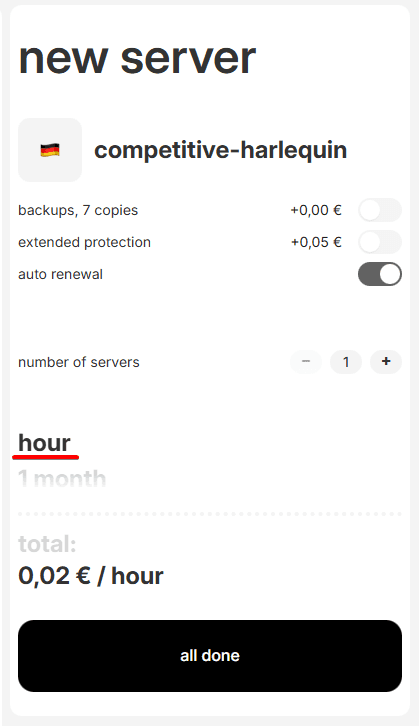
When will payment be charged?
After starting hourly server rental, payment will be charged hourly, starting from the 60th minute from the moment of purchase. And in case the auto-renewal service is enabled, which we have already talked about earlier, the fee will be charged until:
- You extend the hourly server for a month.
- You delete the purchased service.
- Your balance runs out of funds.
Be careful. In case of server shutdown, service stop, server resources continue to be yours and payment will continue to be charged.
Usage scenarios for hourly servers
This solution is ideal for:
- Testing equipment and characteristics for your usage scenario
- Comparing capabilities of different plans for your task
- Solving small one-time tasks, like checking ready code on a virtual server, checking suspicious programs, testing scripts on different operating systems.
- Creating a personal VPN connection for a short time
- Using Windows remote desktop for rendering or other one-time tasks.
If you regularly use a virtual server, we recommend switching it to monthly payment format in the future. This way you can get from 40 to 50 percent savings.
Auto-renewal of hourly servers
When using hourly payment, we advise always enabling automatic renewal of your service, keeping the checkbox during purchase, or enabling auto-renewal in the services control panel:

In case of disabling auto-renewal and absence of manual service payment for the last 24 hours, your server will be automatically deleted, without the possibility of recovering its data.